
The Privacy Settings Worth Changing on Every Device You Own
J
By Joel Anderson on July 2, 2026
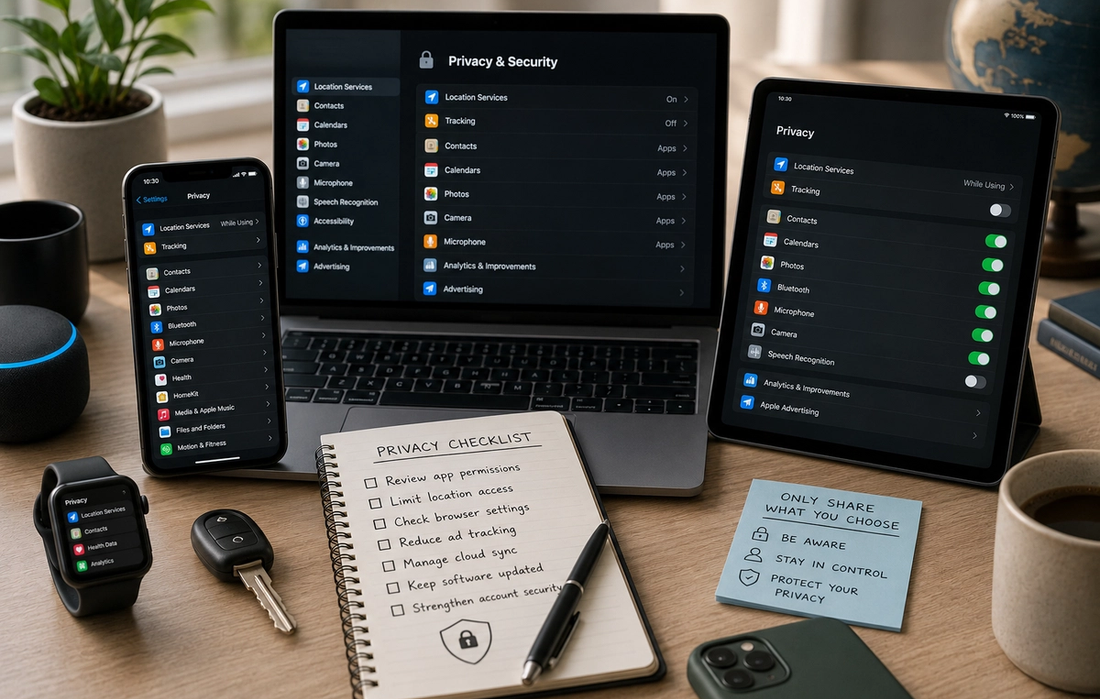
Our phones, laptops, tablets, smart TVs, and even smartwatches know a surprising amount about us. They remember where we’ve been, the websites we visit, the apps we use most often, and the devices we connect to every day. Much of this information helps deliver a smoother experience, making it easier to navigate, sync files across devices, or receive personalized recommendations.
However, many of these features are enabled by default, and most people never take the time to review them. As a result, they often end up sharing far more information than they realize. Fortunately, improving your privacy doesn’t require technical expertise or expensive software. Spending just a few minutes reviewing some key settings can give you much greater control over your personal data while still allowing you to enjoy the convenience of modern technology.
Privacy isn’t about hiding from the internet—it’s about deciding what information you’re comfortable sharing and with whom.
Start by reviewing app permissions
One of the simplest ways to improve your privacy is to check what permissions your apps have been given. Many applications request access to your location, microphone, camera, contacts, photos, or calendar during installation, and it’s common to approve these requests without thinking too much about them.
Over time, it’s worth asking whether every app still needs that level of access. Does a flashlight app really need your precise location? Does a simple game require access to your contacts? In many cases, the answer is no.
Both smartphones and tablets allow you to review and adjust app permissions individually. Removing unnecessary access won’t usually affect the app’s main function, but it can significantly reduce the amount of personal information being collected in the background.
Limit how often your location is shared
Location services are incredibly useful. They power navigation apps, weather forecasts, ride-sharing services, and local search results. But not every application needs to know where you are throughout the day.
Most modern operating systems allow you to choose between several levels of location access, such as allowing an app to access your location only while you’re using it, asking permission each time, or blocking access entirely.
For many apps, allowing location access only when the app is actively open offers the best balance between convenience and privacy. It’s also worth reviewing which apps have recently accessed your location, as this can sometimes reveal permissions you didn’t realize were enabled.
Review your browser’s privacy settings
Your web browser is one of the most important tools you use every day, which also makes it one of the biggest sources of personal data.
Most browsers include privacy features that are worth enabling. These may include blocking third-party cookies, warning you about potentially dangerous websites, preventing websites from tracking your activity across different sites, or automatically clearing certain browsing data.
While these settings won’t make you completely anonymous online, they can reduce unnecessary tracking and give you greater control over how your browsing activity is used.
It’s also a good idea to occasionally clear cookies and review which websites have permission to access features such as your camera, microphone, or location.
Reduce personalized advertising
Many apps and devices use advertising identifiers to personalize the ads you see. These identifiers don’t necessarily reveal your name, but they help build a profile based on your browsing habits, interests, and app usage.
If you’d rather see less targeted advertising, most smartphones and computers include settings that allow you to limit ad personalization or reset your advertising identifier.
Disabling these features won’t eliminate advertisements altogether, but it does reduce the amount of information used to tailor them specifically to you. For many people, it’s a simple adjustment that offers greater peace of mind without affecting how their device functions.
Check what your cloud account is syncing
Cloud storage has made it incredibly easy to keep files available across multiple devices. Photos taken on your phone can instantly appear on your laptop, notes update automatically, and important documents remain safely backed up even if your device is lost.
However, many people aren’t fully aware of everything being synchronized.
Depending on your settings, your cloud account may also store messages, contacts, calendars, browsing information, app data, and complete device backups. There’s nothing inherently wrong with this, but it’s worth reviewing what’s included to ensure it matches your personal preferences.
Most cloud services allow you to choose exactly what gets synchronized, giving you more control over the information stored online.
Keep your devices updated
Privacy and security go hand in hand.
Software updates aren’t just about adding new features—they frequently contain important security patches that fix vulnerabilities discovered by researchers. Delaying updates can leave your devices exposed to issues that have already been addressed by the manufacturer.
Whenever possible, enable automatic updates for your operating system and your apps. This ensures you’re receiving the latest security improvements without needing to remember to install them manually.
Keeping your software current is one of the simplest and most effective ways to protect your personal information.
Strengthen your account security
Even the best privacy settings won’t help if someone gains access to your accounts.
Using strong, unique passwords for important services is essential, but it’s only part of the solution. Enabling two-factor authentication adds an additional layer of protection by requiring a second form of verification when you sign in.
It’s also worth reviewing which devices are currently logged into your accounts. Removing devices you no longer own or recognize helps reduce the risk of unauthorized access.
Strong account security gives you greater confidence that your personal information stays in your hands.
Privacy is about making informed choices
Many people assume privacy is only important for those who have something to hide. In reality, privacy is about having control over your own information.
Just as you choose who enters your home or reads your personal mail, you should also be able to choose what your devices collect and share. Not everyone will make the same decisions, and that’s perfectly fine. The important thing is that those decisions are intentional rather than simply accepting every default setting.
Technology should adapt to your preferences—not the other way around.
A few minutes today can make a lasting difference
Improving your digital privacy doesn’t require disconnecting from technology or becoming an expert in cybersecurity. In most cases, a handful of simple adjustments can significantly reduce unnecessary data collection while preserving all the convenience your devices offer.
Reviewing app permissions, limiting location access, checking browser settings, reducing personalized advertising, enabling automatic updates, and strengthening your account security are all small actions that add up over time.
The more you understand your privacy settings, the more confident you’ll feel using your devices. After all, the best technology isn’t just powerful—it’s technology that works on your terms.


AI

How AI Actually Works (No Math Required)

How to Spot AI-Generated Content Even When It’s Good

The Real Difference Between AI, Machine Learning, and Deep Learning

How to Prompt AI Like a Pro







Read More

Why the World Feels Faster Than Ever (And What to Do About It)
Astrid Jensen|
Why Some People Notice More Than Others
Joel Anderson|

Why the Slow Things Are Quietly Winning
Brett Crane|

How to Spend Less Without Feeling Deprived
Joel Anderson|

How to Spend a Sunday Like You Mean It
Brett Crane|

The Inventions That Changed How We Live (And Why)
Karina Leon|